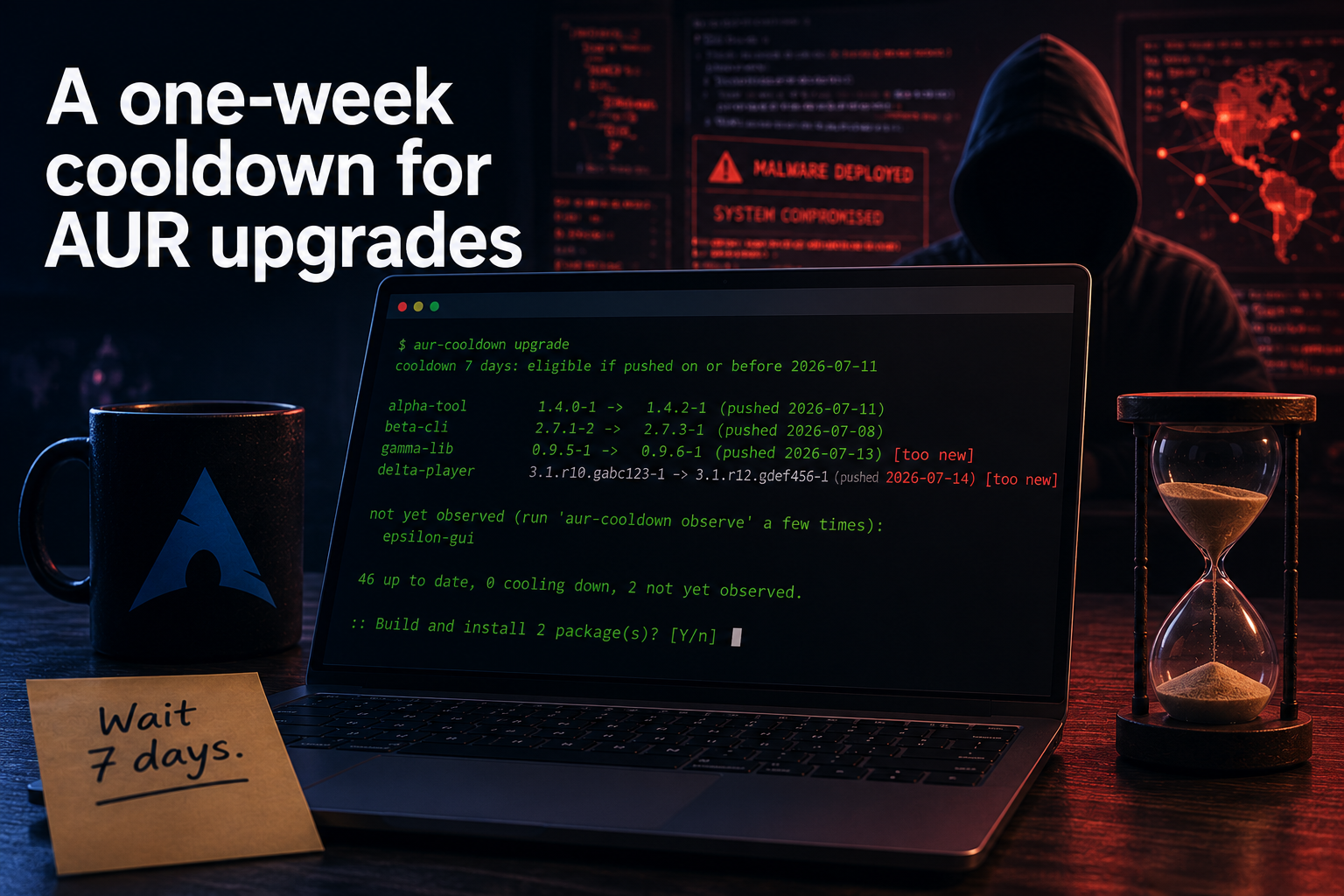
Twice in the past year, installing an update from the Arch User Repository (AUR) could have handed your machine to somebody else. In July 2025, three fake browser packages were uploaded which pulled in a remote access trojan (Chaos RAT). They went up on July 16 and were removed on July 18; about two days of being live. In June 2026, the “Atomic Arch” campaign backdoored more than 400 packages (over 1,500 by some counts) to ship an infostealer, plus an eBPF rootkit when it landed as root. The first malicious pushes landed on June 11, a second wave came on June 12, and the advice that went out was to treat any AUR install between June 11 and 13 as suspect. So again, roughly two days.
That number, two days, is the whole reason this post exists. I run a bunch of
AUR packages, and when I heard about the first incident, I stopped updating my
AUR packages. But we all know that’s not a real solution, and it took a little
bit to figure out what to do next. First, I looked for a way to have a cooldown
period with yay, which is the package manager I use. And it turns out as a
response to these incidents, yay actually added Lua hooks, which allow you to
add the cooldown period.
However, that doesn’t help me with some packages I actively use, since they release very frequently, and the one week cooldown policy would simply make them never get updated. So I ended up developing my own tool: aur-cooldown, which only installs releases which have survived a week on AUR. Here’s why that’s worth doing, and the surprising number of ways one can get it wrong.
Cooldown period
Look at how both incidents ended. The AUR has no review before things are published, but it has a lot of eyeballs after the fact; in both cases the community flagged the malicious packages within a day or two, maintainers reverted the commits and banned the accounts, and that was that.
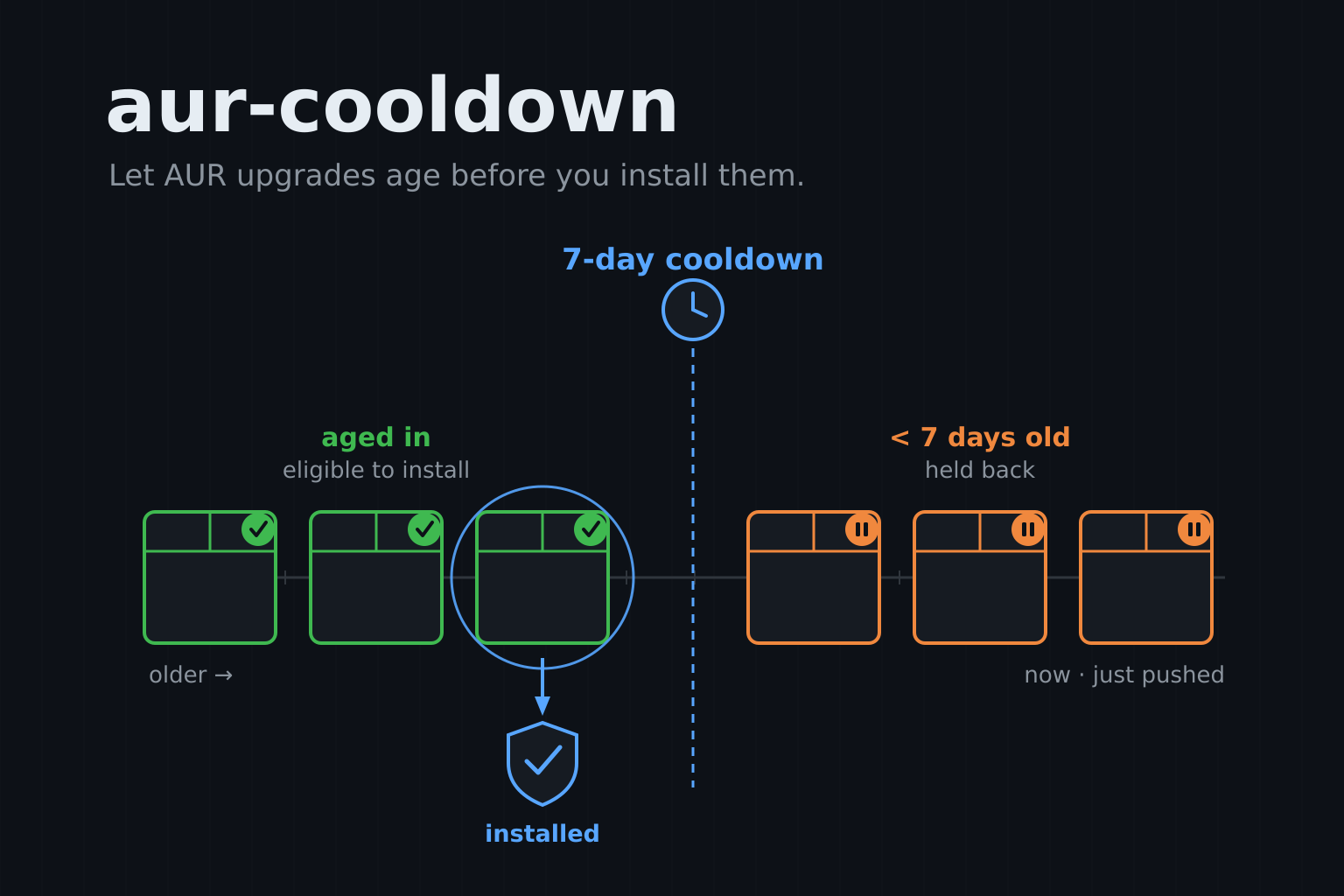
Which means waiting a couple of days before installing a release is an easy defense. If you only ever install versions which have already been public for a week, you would have missed both of these incidents, and hopefully within that week maintainers have detected and redacted the release.
That’s all the tool does. A version becomes installable once it has survived
N days (7 by default) in the AUR, and not before.
The yay hook
yay 13 added Lua hooks, and they
turned out to be the perfect place to start. A small UpgradeSelect hook in
~/.config/yay/init.lua looks at every AUR upgrade yay -Syu is about to do,
and drops the ones which are too fresh:
yay.create_autocmd("UpgradeSelect", {
  callback = function(event)
    local exclude = {}
    local cutoff = os.time() - (7 * 24 * 60 * 60) -- one week
    for _, pkg in ipairs(event.data.upgrades) do
      if pkg.repository == "aur" and pkg.last_modified >= cutoff then
        table.insert(exclude, pkg.name)
      end
    end
    return { exclude = exclude }
  end,
})
For most packages, the ones which release less often than weekly, this is the entire story. Updates simply arrive a week late, and nothing else about your workflow changes.
Fast moving packages
The problem is the packages which release more than once a week: editors, AI tools, some browsers. Their newest version is always younger than a week, so a hook which excludes everything fresh excludes them forever, and you’d never get another update. I noticed this rather quickly, since several of the offenders are tools I use every day.
What I actually want for those isn’t “skip the update”, it’s “give me the
newest version which has already aged past a week”. The current tip might be
two hours old, but the release from eight days ago is fair game, and that’s
the one I should build. This is what the aur-cooldown command does, and it’s
where the whole thing stops being a five line hook and starts needing to think
about attackers.
Which clock do you trust?
Just look at the git log, they say, right? To install “the newest version
which is at least a week old”, you need to know how old each version is. The
obvious source is git: every AUR package is a git repo, so run git log and
read the commit date. Except, …, NOPE!
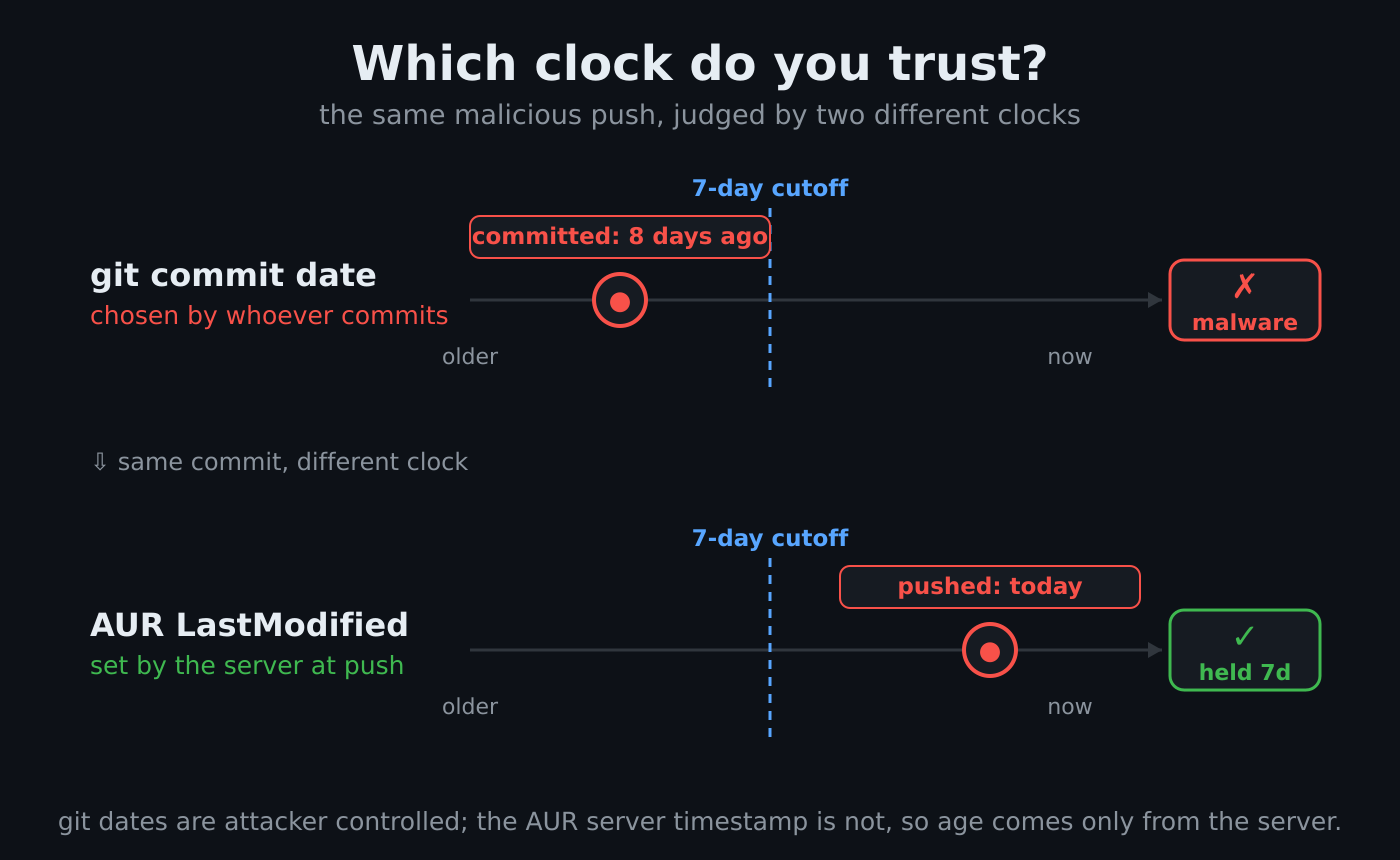
Don’t do this! Git commit dates are chosen by whoever makes the commit;
GIT_COMMITTER_DATE=whatever git commit will happily stamp a commit with any
date you like. That’s how tools like
github-activity-generator
work. An attacker who wants to defeat a naive cooldown would simply backdate
their malicious commit by eight days, and a tool measuring age with git log
would wave it through as already aged.
The clock you can trust is the AUR server’s. The AUR RPC
interface reports a
LastModified timestamp which the server sets when it accepts a push, and the
uploader can’t influence it. That’s the age the aur-cooldown observe uses,
and it never reads a date out of git.
There’s a catch though: the RPC only reports LastModified for the current
version, and it won’t tell you when some older version was pushed. So the tool
keeps a local ledger and appends to it over time; you run aur-cooldown
observe every few days (a shell reminder nudges you when you forget), and each
run records the versions it sees together with the server’s timestamp. Since
the AUR server doesn’t give us information about the history of a package, we
need to create that locally; not ideal, but works.
Binding versions to commits
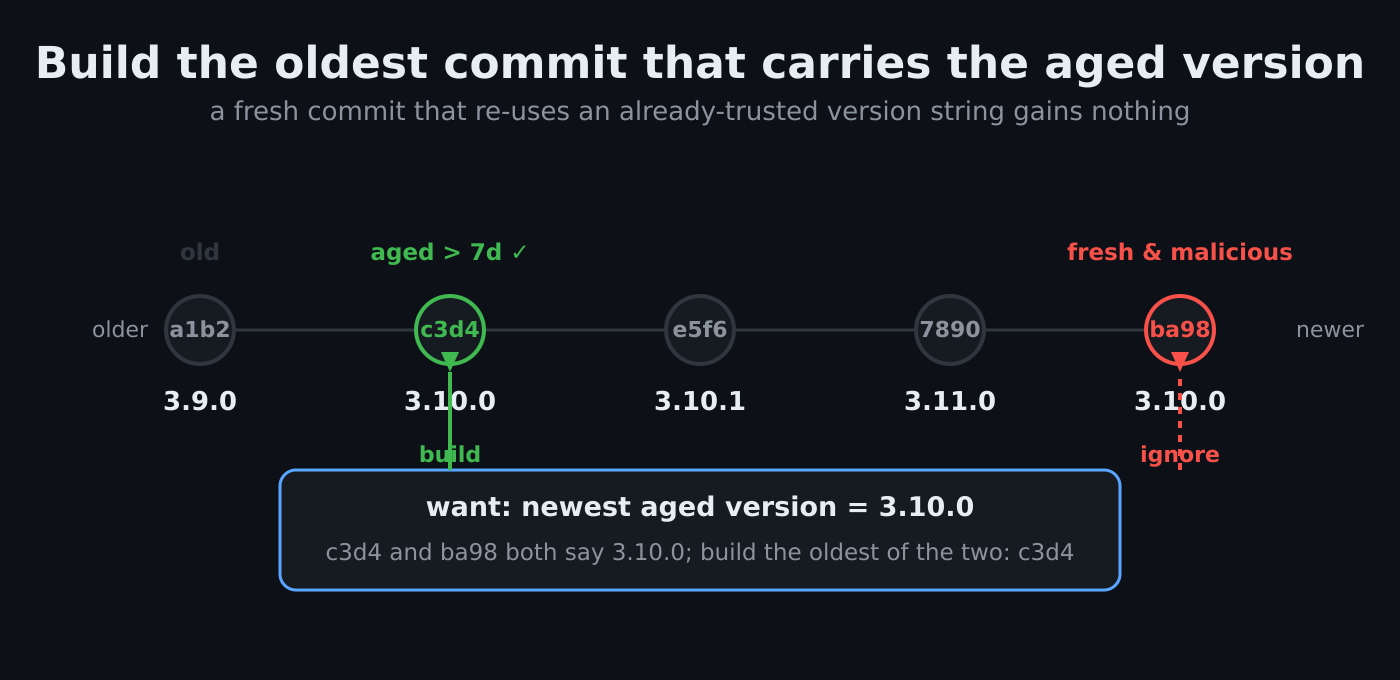
A version string is just a line in the PKGBUILD file, and nothing stops an
attacker from pushing a brand new commit today whose PKGBUILD says 3.10.0;
a version our ledger already considers safely aged. If the ledger only knew
“3.10.0 is old enough”, the tool would happily check out the attacker’s fresh
commit and build it. The name is aged, the code isn’t. So the age has to be
attached to the code itself, and next to each version and timestamp, the
ledger records the exact git commit which carried that version when observe
saw it.
Even recording that pair has a race in it. observe first asks the RPC
“what’s the current version, and when was it pushed?”, and then reads the
commit at the tip of the package’s git repo. If an attacker’s push lands
between those two reads, we’d record the attacker’s commit next to the older,
innocent timestamp. So observe asks the RPC a second time after reading the
commit, and only records the entry if nothing changed in between; otherwise it
throws the observation away and tries again on the next run.
Then at upgrade time, the recorded commit is checked against the package’s current git history, and each outcome maps to a real scenario:
- The recorded commit is no longer in the history. This is what an incident cleanup looks like: AUR staff delete the malicious commits or reset the branch. The tool treats that version as yanked and waits, instead of looking for something else with the same name.
- The version string appears on more than one commit: our recorded old one,
and a fresh one from an attacker re-using the aged name. The tool builds the
oldest commit carrying the version, not the recorded one. This feels
backwards at first (why not just check out the hash we wrote down?), but the
recorded hash is the least trusted input we have; it’s a note in a local
file, written from a read which races with pushes. “Oldest in the canonical
githistory” is a position an attacker can’t reach, since new pushes are always descendants, and rewriting history to insert an older commit would drop our recorded commit from the history and trip the previous check. So the ledger decides whether a version is eligible, and thegithistory decides which commit to actually build.
All of these checks follow one rule: when the tool can’t be sure, it does nothing. Anything the tool can’t verify means it waits, and never installs. A version it never observed is never installed; a network hiccup keeps the previous state and nothing new becomes eligible. The worst case behavior of every branch is “you wait longer”, which is exactly the failure mode you want from something whose entire value is patience.
Building the right commit
Two parts of the build step need care.
First, actually building an old commit. yay -B can’t be used for this: it
treats the build directory as a clone it wants to update to the latest commit,
which is precisely the opposite of what’s needed here. In contrast, exporting
the vetted commit with git archive into a plain tree with no .git in it,
and building that with makepkg, makes the build step git-operation-free, so
there’s no chance of drifting off the commit which was checked.
Second, root. makepkg -si reaches for sudo, which is no good on a machine
where the user isn’t a sudoer and escalates with su (like yay‘s --sudo=su).
So the tool builds as the user, then installs the built package through a
configurable escalator (sudo, su, doas, …), printing the exact
privileged command before running it. It also caches downloaded sources, so
retrying a failed build doesn’t re-download a few hundred megabytes.
A denylist as a second defensive layer
The cooldown only protects while a bad version is caught within the week, so there is an optional second layer: a denylist, built from the community-maintained aur-malware-check campaign data.
Each campaign records a date window during which the compromise was live, and the ledger already holds every version’s AUR push timestamp, so denial is (name, version)-scoped: a version is refused only when its push timestamp falls inside a campaign’s window. A package hijacked between June 9th and 14th has exactly those versions refused; whatever it ships after the cleanup installs normally, and the block lifts on its own once a clean version exists. The timestamp, as everywhere else in the tool, comes from the server’s clock, never from anything an attacker controls.
Some campaigns carry no window. Their packages are still legitimate
hijacked-then-cleaned ones, and a reset cleanup is already caught by the
history check from earlier (a version whose commit is gone from the canonical
history is skipped), so a name-level freeze would be both wrong and redundant.
For these the tool blocks nothing: it prints an advisory naming any installed
package that appears on such a list, and points at aur-malware-check’s scanner
to check whether the machine was hit, and at IgnorePkg for hard-blocking one
by hand. Scoping is left to the person, because the tool cannot derive it from
a bare name.
A denylist is fail-safe throughout: it can only withhold an install, never cause one. The worst a wrong, stale, or even hostile list can do is make you wait, which is what makes it safe to consume from a third party at all.
What it doesn’t do
It doesn’t inspect package contents. It’s not a scanner, and it won’t tell you whether a PKGBUILD is malicious; I don’t think most folks can reliably eyeball that (I certainly wouldn’t bet my machine on me spotting it), and I didn’t want the security of the thing to rest on anyone doing so. The delay itself is the protection. If you want to check whether a machine was already hit by a known campaign, that’s a different tool (aur-malware-check again); aur-cooldown is about staying out of the window, not cleaning up after it.
Publishing on AUR
Shipping a supply-chain-safety tool to the AUR is itself a supply chain question, which was a fun realisation.
The AUR authenticates pushes with an SSH key and has no 2FA, so that key is the
only thing standing between my package and an attacker. The release runs from a
GitHub Actions workflow, and I tried to keep it as locked down as I could: it’s
triggered manually only (a tag push can be fired by a leaked git credential,
while a manual dispatch requires a session behind my GitHub’s account 2FA), the
AUR key is an environment secret behind a required-review gate which even
admins can’t bypass, restricted to the main branch, and the one third party
action it uses is pinned by commit SHA.
Of course one could go further and have a separate repo to publish a package, but I’d skip that for now.
Try it
yay -S aur-cooldown
aur-cooldown setup # wires the yay hook + a reminder into your config
aur-cooldown observe # run every few days to build up history
aur-cooldown upgrade # installs versions that have aged past the cooldown
It’s a single Python file, standard library only, MIT licensed, on GitHub and the AUR. The full security model and its known limits are written out in the README, and bug reports, or better, holes in the threat model, are very welcome.
References
- The AUR incidents: Chaos RAT, July 2025: BleepingComputer, The Register; “Atomic Arch”, June 2026: BleepingComputer, Linuxiac (timeline), The Hacker News, Phoronix.
- yay 13’s Lua hooks, which the cooldown hook is built on.
- aur-malware-check, detection and campaign lists, complementary to this tool.
- aur-cooldown itself.